
Help & Documentation
Everything you need to know about using Contractor Link.
Can't find what you're looking for? Contact us
Customer Help Center
How to use Contractor Link as a customer.
How It Works
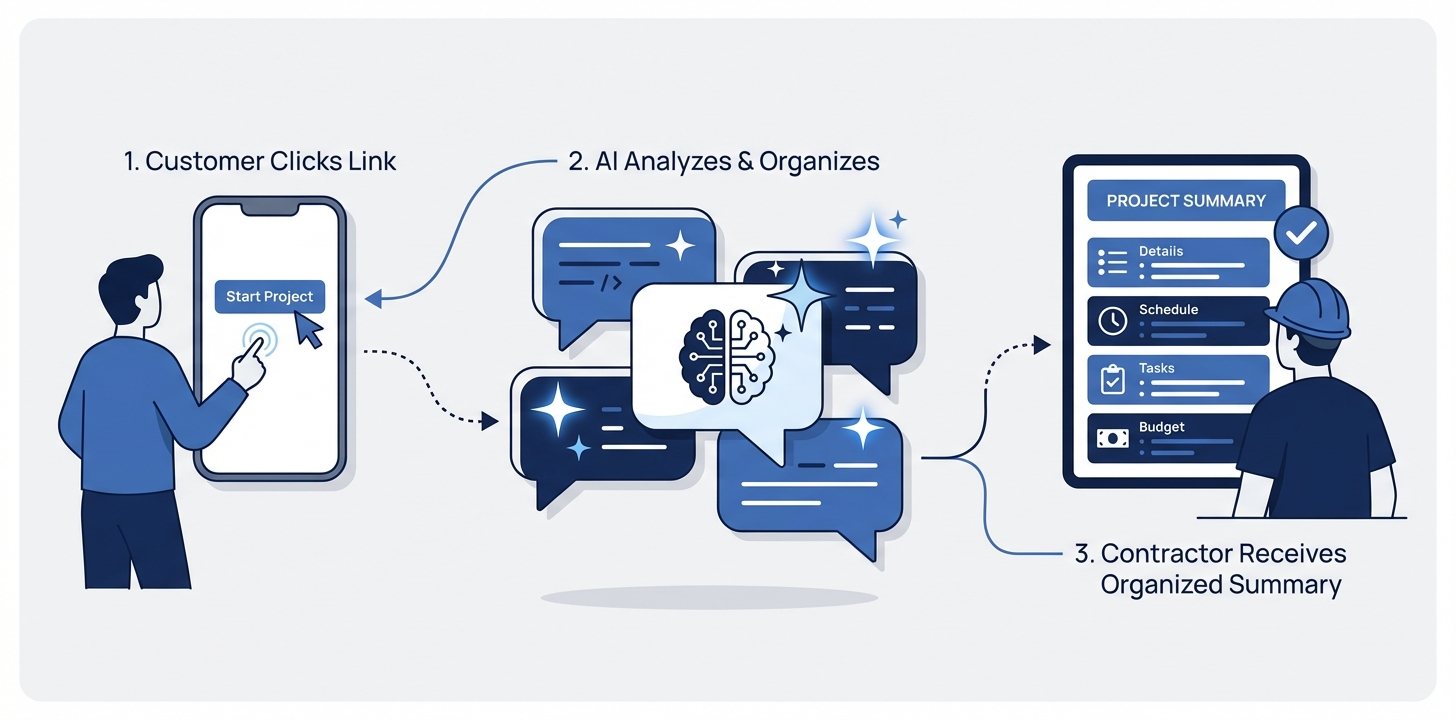
Contractor Link connects you directly with your contractor through an easy, AI-guided service request process — no account needed.
No Account Required
You don't need to create an account or download an app. Just click your contractor's link and describe what you need.
What is Contractor Link?
How did I get here?
What should I expect?
Here's the typical flow:
- You click your contractor's link
- An AI assistant asks you a few questions about your issue
- You can upload photos or videos to help explain the problem
- You provide your contact details and address
- Your contractor receives a detailed summary of your request and will reach out to you
Submitting a Service Request
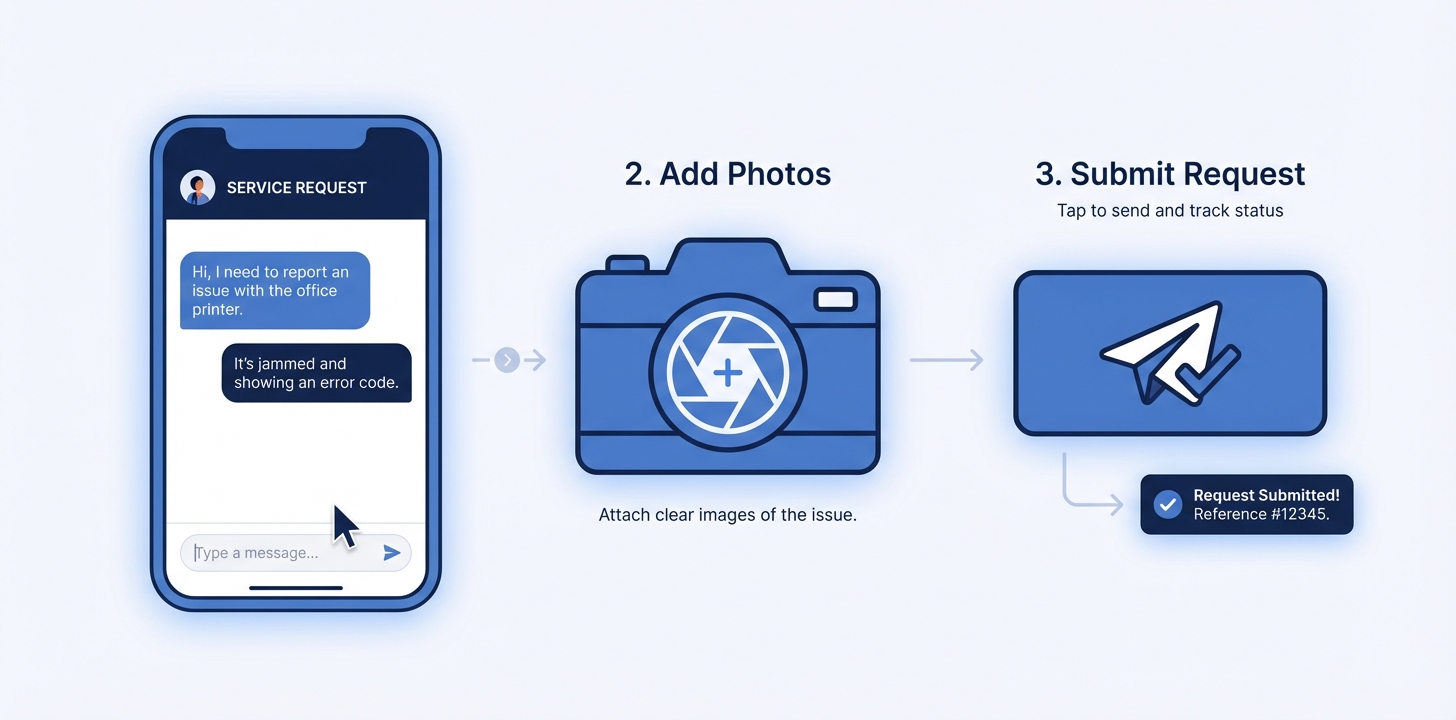
Submitting a service request is quick and straightforward. The AI-guided form will walk you through everything step by step.
Step-by-Step Guide
- Click your contractor's link — This opens their service request page
- Select the service you need — Choose from the services your contractor offers
- Answer the AI questions — The assistant asks relevant follow-up questions based on your issue (e.g., where is the leak? how long has it been happening?)
- Upload photos or videos — Show the problem visually so your contractor can come prepared
- Provide your contact info — Name, email, phone number, and service address
- Submit — Your contractor receives a detailed summary with all the information you provided
What Happens After You Submit
Your contractor will receive your request immediately, including an AI-generated summary of the issue, your photos/videos, and your contact details. They'll reach out to you directly via phone, email, or text to discuss next steps, provide a quote, or schedule a visit.
Tip
The more detail you provide, the better prepared your contractor will be. Clear photos of the issue, information about when it started, and any relevant details (like the age of your equipment) help your contractor give you an accurate quote.
Can I upload photos and videos?
How long does it take to fill out?
Address History & Sharing
If your address has been serviced before through Contractor Link (by any contractor), you may see past service records during the address step. You can choose to share relevant records with your new contractor so they understand your property's service history.
- Equipment — Known items at your address (e.g., water heater, furnace) are shown so you can select the ones relevant to your request
- Past service history — Completed service records from other contractors at your address are shown anonymously (no contractor names)
- Opt-in sharing — You choose which records to share. Nothing is shared unless you select it.
Your Choice
Sharing past service history is completely optional. You can skip it entirely and start fresh. Shared records help your contractor come better prepared — for example, knowing that your AC was repaired 6 months ago gives them useful context.
Communication & Notifications
After submitting your service request, here's how your contractor will communicate with you and what notifications to expect.
How You'll Hear From Your Contractor
Your contractor will contact you directly using the contact information you provided — typically by phone call, text message, or email. Response times vary by contractor, but most respond within a few hours.
Appointment Reminders
Once your contractor schedules a visit, you'll receive automatic reminders so you don't forget:
- Day-before email — A reminder email sent the day before your appointment
- Morning-of SMS — A text message reminder on the morning of your appointment
Reschedule-Safe
If your contractor reschedules the appointment, you'll receive updated reminders for the new date. You won't get duplicate notifications.
"On My Way" Notifications
When your contractor is heading to your location, you may receive an "On My Way" text message with their estimated arrival time (e.g., "Your contractor is on the way! ETA: ~15 minutes"). This helps you plan your day and be ready when they arrive.
What if I haven't heard back?
If your contractor hasn't responded within 24-48 hours:
- Check your email spam/junk folder for any messages
- Try calling or texting your contractor directly using the contact info on their page
- Submit a new request if you think the original may not have gone through
- Contact us if you need help
Quotes & Invoices
Your contractor may send you quotes and invoices through Contractor Link. Here's what to expect.
Reviewing a Quote
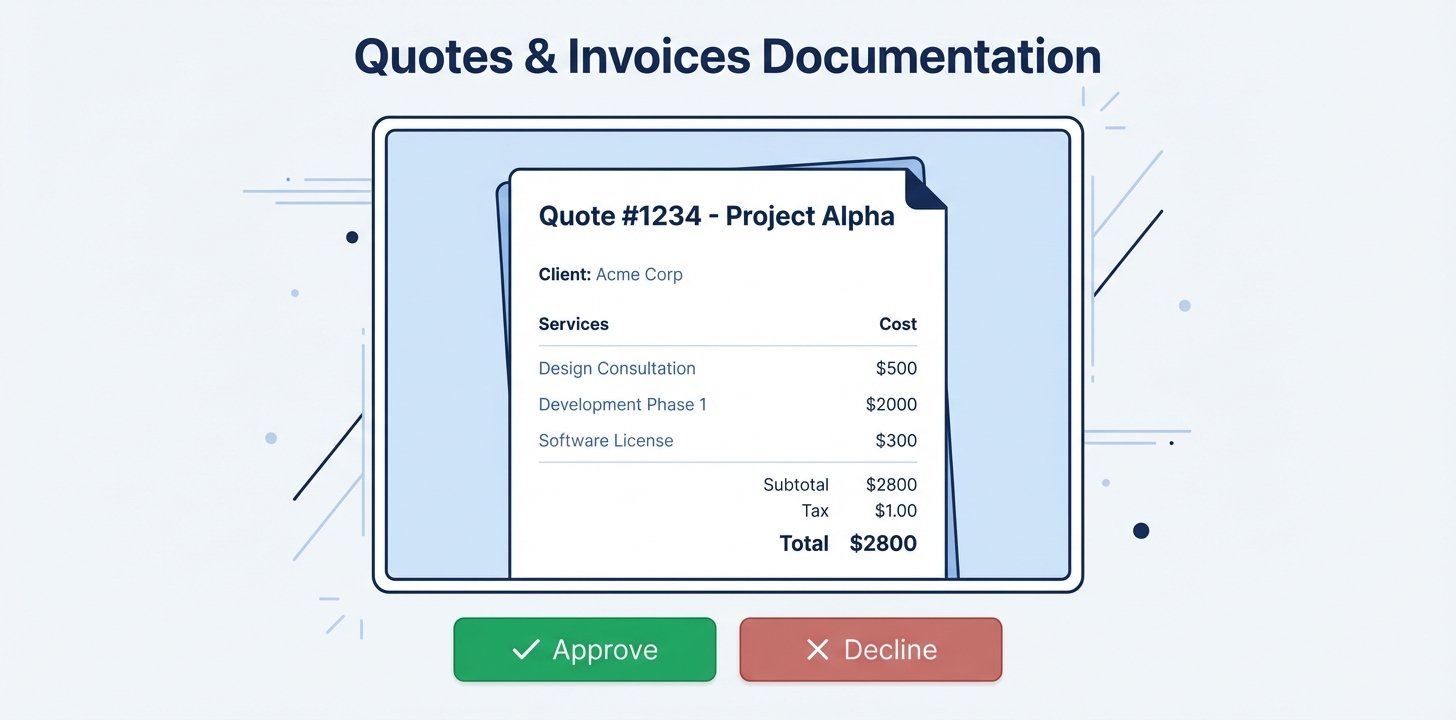
When your contractor sends you a quote, you'll receive an email and/or text message with a link to view it. The quote page shows:
- Your contractor's business name and branding
- A detailed breakdown of all line items (labor, materials, etc.)
- Subtotal, tax, and total amounts
- Any notes or terms from your contractor
- The quote's expiry date
Approving or Declining
At the bottom of the quote page, you'll see two buttons:
- Approve Quote — Confirms you'd like to proceed with the work at the quoted price
- Decline Quote — Lets your contractor know you'd like to pass or discuss further
Your contractor is notified immediately of your decision by email and SMS. No account or login is needed — just click the link in your email or text.
PDF Download
You can also download a PDF copy of the quote for your records. The PDF includes all the same details shown on the page.
What if the quote has expired?
Can I change my mind after approving?
My Home
My Home is your personal portal where you can view all your service requests, tracked equipment, and contractors — all in one place. No account or password needed.
No Account Needed
Access My Home by visiting /my-home and entering your email address. We'll send you a one-time code — no password to remember.
What You'll Find
- Requests — All your service requests across every contractor, with status updates and conversation history
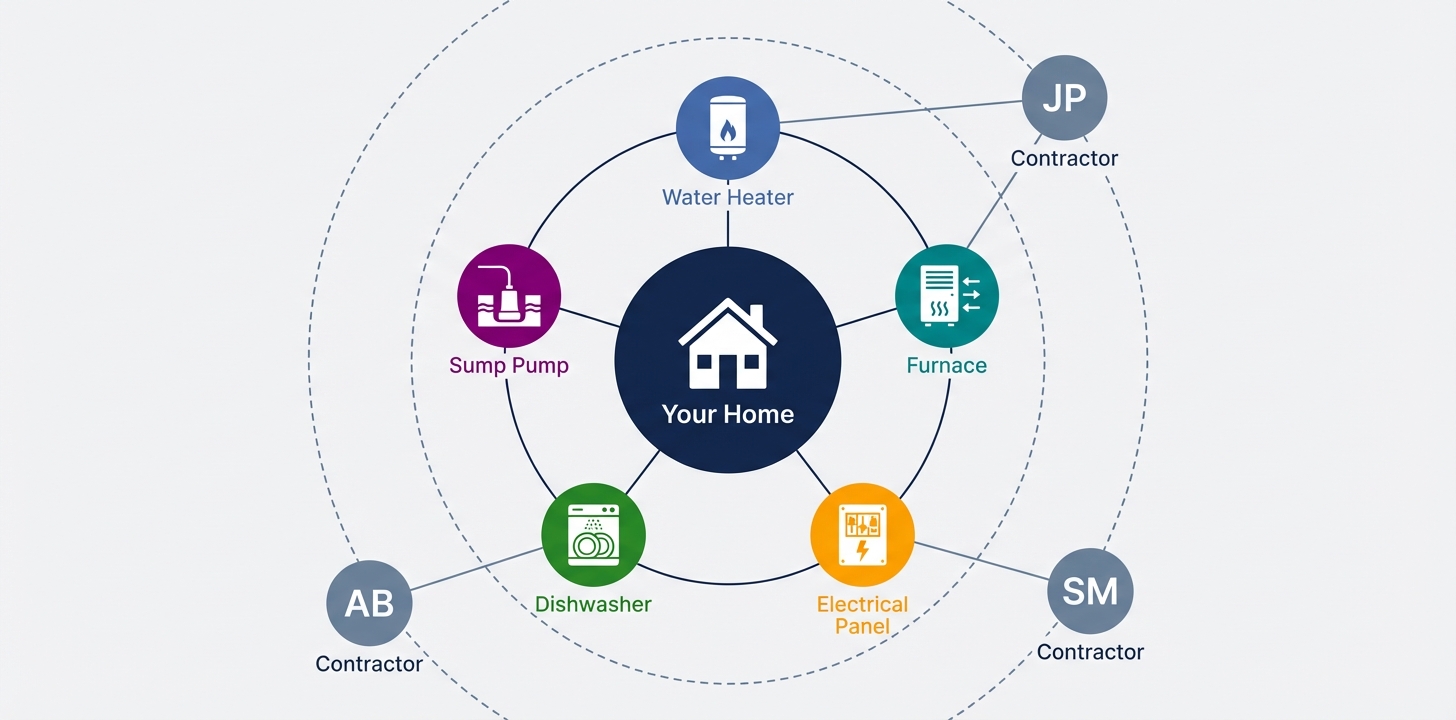
- Your Home — An interactive graph of your address showing tracked equipment and appliances, linked to the contractors who've serviced them
- Contractors — A list of every contractor you've worked with through the platform, with quick access to their profile and your shared history
How Equipment Gets Tracked
You don't need to manually add your equipment. When you submit a service request, our AI reads the conversation and automatically identifies appliances, fixtures, and systems at your address.
- You submit a service request describing your issue
- The AI extracts equipment details from the conversation (e.g., "50-gallon gas water heater installed in 2019")
- Those items appear in your address graph under My Home
Builds Over Time
Your home profile gets richer with every service request. Over time, you'll have a complete picture of the equipment and systems at your address — useful for future service calls, warranty tracking, and home maintenance.
The Address Graph
The address graph is an interactive orbital visualization that puts your home at the center and shows how everything connects — your equipment, contractors, and service history.
- Home node — Your address at the center of the graph
- Equipment nodes — Color-coded by category (plumbing, HVAC, electrical, etc.) on the inner ring
- Contractor nodes — Contractors who've serviced your address on the outer ring
- Inquiry links — Connecting lines show which contractors have worked on which equipment
How do I access My Home?
Visit /my-home and enter the email address you've used for service requests. We'll send you a one-time verification code — enter it and you're in. No password or account creation needed.
What if I have multiple addresses?
How does my equipment get added?
Can I edit my equipment list?
Who can see my home data?
Privacy & Your Data
We take your privacy seriously. Here's what information is collected and how it's used.
What Information Is Collected
- Contact details — Your name, email address, and phone number
- Service address — The location where you need service
- Issue description — Your answers to the AI questions and any details you provide
- Photos & videos — Any media you upload to show the issue
Who Can See Your Information
Your information is shared only with the contractor you submitted the request to. We do not sell, share, or distribute your personal data to third parties, other contractors, or advertisers.
Shared Address Service History
When starting a new service request, you may see past service records from other contractors at your address. If you choose to share these with your new contractor:
- Shared records are fully anonymized — no contractor names or business information is ever revealed
- Only completed service records are available to share (not pending or declined requests)
- Sharing is one-way and permanent — once shared, the records are linked to that inquiry
- The shared information includes only the service type, a summary of the issue, urgency level, and date
Your Data Is Protected
All data is transmitted over encrypted connections (HTTPS) and stored securely. Your photos and videos are stored in private, encrypted storage accessible only to your contractor.
Data Deletion
If you'd like your data removed from the platform, contact us with your name and email address, and we'll process your request.
Will I receive marketing emails?
Can other contractors see my information?
No. Your personal information (name, phone, email) is only visible to the contractor you submitted the request to.
The one exception is address service history: when you start a new request, you may see anonymized summaries of past services at your address from other contractors. You can choose to share some of these with your new contractor — but only the service type, summary, and date are shared, never the original contractor's name or your personal details from those past requests.
Need Help?
If you have questions or need assistance, we're here to help.
Contact Us
How do I get in touch with support?
You can reach us through our Contact Us form. We typically respond within 24 hours.
Contact Your Contractor Directly
For questions about your specific service request, scheduling, or pricing, the best person to contact is your contractor directly. Their contact information is available on the page where you submitted your request.
Tip
If you've lost your contractor's link, try searching your email or text messages for their business name or "Contractor Link" — you may find the original link they shared with you.
Still Have Questions?
We're here to help you get the most out of Contractor Link. Get in touch with our team today!